StudioFeel Equalizer & Bass brings studio-grade DSP to Android
StudioFeel Equalizer & Bass by Eidoltroner tunes mobile audio into a studio-like listening experience across apps. The app applies device-wide digital signal processing with a 10-band parametric equalizer, adjustable bass boost, voice enhancement, and a volume booster with a brick-wall limiter to affect music, video, and games. Smart presets, headphone-matching profiles, multiple live visualizers, and a distraction-free Focus Mode help adapt sound to each listening context, and local on-device processing ensures privacy. Audiophiles, podcast listeners, and casual headphone users who want clearer, fatigue-free listening on Android devices.

Unlock your creativity with Adobe Stock
Get 10 images or 1 video with a free trial
What is StudioFeel used for?
StudioFeel is a mobile audio enhancer that applies DSP across the device, transforming playback from music players, streaming video, and games into a tuned listening session. Its 10-band parametric equalizer gives finer-frequency control than typical 5-band mobile EQs, and the app combines bass shaping, vocal enhancement, and a high-range volume booster with a limiter to control distortion. Unlike basic players, it attaches to global audio sessions so adjustments affect any active media app.
What audio contexts and hardware does it support?
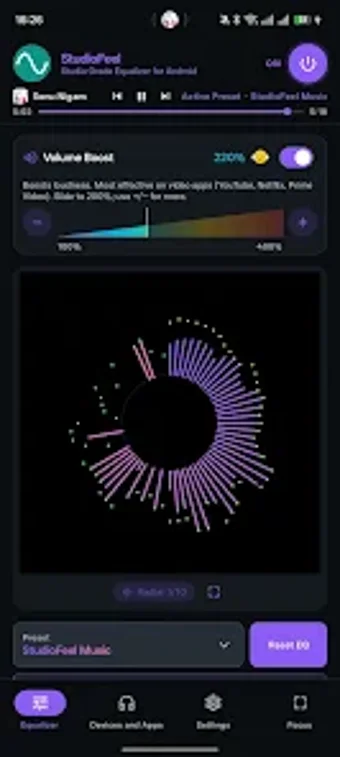
The app targets headphone-centric listening and connected speakers, with automatic preset switching based on the active app or the connected hardware. Visual feedback comes from several live visualizers, including spectrum, radial, oscilloscope, and bar views. The interface includes a Focus Mode for full-screen playback. Processing happens locally on the device, so audio and usage data remain on-device rather than routed to external servers.
Is it better for audiophiles or casual listeners?
StudioFeel suits users who want measurable tonal control, from careful frequency shaping to controlled bass. What's more, smart presets and headphone-matching profiles lower the barrier for non-technical listeners by offering ready-made tunings. The trade-off is that the precision controls demand some learning to use effectively. The developer notes the app is optimized for modern Android versions, so older devices may not support every integration feature.
In conclusion, a capable choice for listeners ready to tune their sound
In conclusion, StudioFeel is a measured choice for Android listeners who want finer tonal control and application-aware behaviour; it rewards users willing to learn signal-shaping techniques. It fits headphone-focused workflows on contemporary devices that support deep audio integration. Listeners seeking instant, no-setup playback may find its controls more involved than simpler media players, but those who invest effort gain greater control over long listening sessions.